Minimus is ending operations. We appreciate the support of our many customers globally and are proud to have served you. Unfortunately, the current business and investment climate has resulted in a situation in which we are unable to continue operations. We acknowledge the effort that transitioning from our images will require and we are committed to providing customers with a stable transition period.
Beginning on Monday 24 August 2026, we will begin a 60 day maintenance period for the product and images. During this period, we will make necessary bug fixes to the overall product, provide commercial support, and continue to maintain images with upstream updates. On Thursday 22 October 2026, we will cease operations and turn off the Minimus registry (reg.mini.dev). Images pulled from the registry prior to 22 October will, of course, continue to function, but no further updated images will be provided.
For Enterprise Edition customers, we are committed to ensuring a fair and orderly conclusion to our commercial relationships. We will reach out to each Enterprise Edition customer individually, beginning on 24 August, to discuss the structured termination of your agreement, including any applicable refunds for the remaining contract period beyond 22 October.
While this is not the outcome that any of us wanted, we hope that this approach provides customers with ample opportunity to smoothly transition.
Traditional container images inherit a large number of packages from their base distribution. These packages often include utilities, libraries, and system components that are not required by the application but still remain part of the image. While they may not be actively used by the application, they increase the overall attack surface and can introduce additional vulnerabilities.
Minimus images take a different approach by building minimal, distroless runtime images that contain only the packages necessary for the application to run.
Minimus Package Count & Risk Comparison
To make this difference easy to visualize, Minimus includes a Package Count & Risk Comparison between the Minimus image and the corresponding public image. This comparison highlights how many packages are included in each image and shows how much unnecessary software has been removed.
In many cases, the difference is significant. A typical public image may contain hundreds of packages inherited from the base operating system, while the Minimus image contains only the minimal set required at runtime.
Example: Minimus Node Image Package Comparison
Package Count and Risk Comparison for Minimus Node Image
For example, the public node image contains over 500 packages, while the Minimus node image includes only a few dozen packages. These remaining packages consist of essential runtime components such as core libraries, certificate bundles, and minimal system utilities required by the application.
Understanding the Minimus Package Visualization
The Minimus package count view can be found inside the “Risk Reduction” tab for each Minimus image. Each square represents a single package included in the image. This makes it easy to immediately see the scale of the difference between the Minimus and public images.
In the public image section, packages are also separated between the base layer and additional layers. The base layer represents the operating system packages included in the image, such as system libraries and core utilities. Additional layers represent packages introduced when the image is built or extended for a specific application. This view helps illustrate how container images accumulate software components and where most of the packages in the image originate.
Each package in the comparison is also color-coded according to the highest severity level of the vulnerabilities associated with that package, making it easy to identify which components introduce higher security risks.
The Minimus package Visualization allows users to quickly see not only how many packages exist in the image, but also how security risk is distributed across those components.
Package-Level Vulnerability Comparison
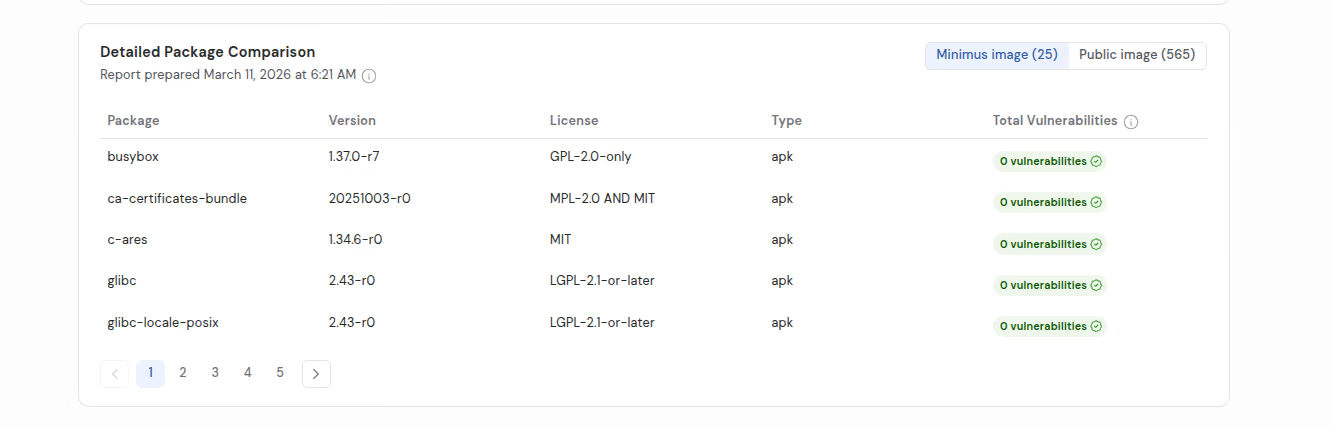
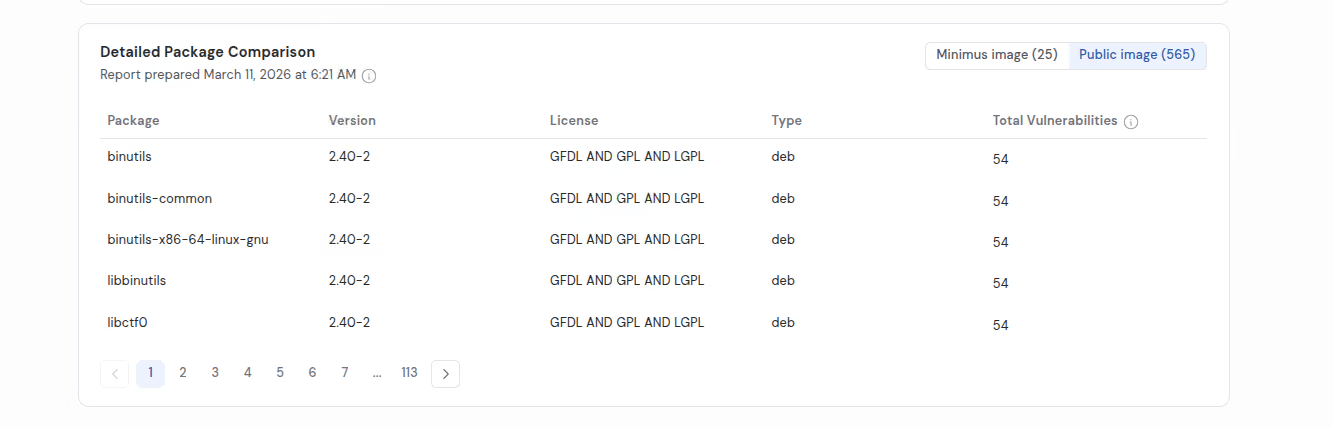
In addition to the package visualization, Minimus also provides a detailed package comparison for each image. This view shows every package included in the Minimus image and the corresponding public image, along with the number of vulnerabilities affecting each package.
Minimus Detailed Package Comparison, showing public node image packages.
This makes it possible to examine not only the total number of vulnerabilities in an image, but also which packages introduce them.
To illustrate this difference, the table below compares several images and highlights the differences in package count and current vulnerability exposure between Minimus images and the corresponding public images.














.svg)
.svg)




.svg)




.svg)