Minimus is ending operations. We appreciate the support of our many customers globally and are proud to have served you. Unfortunately, the current business and investment climate has resulted in a situation in which we are unable to continue operations. We acknowledge the effort that transitioning from our images will require and we are committed to providing customers with a stable transition period.
Beginning on Monday 24 August 2026, we will begin a 60 day maintenance period for the product and images. During this period, we will make necessary bug fixes to the overall product, provide commercial support, and continue to maintain images with upstream updates. On Thursday 22 October 2026, we will cease operations and turn off the Minimus registry (reg.mini.dev). Images pulled from the registry prior to 22 October will, of course, continue to function, but no further updated images will be provided.
For Enterprise Edition customers, we are committed to ensuring a fair and orderly conclusion to our commercial relationships. We will reach out to each Enterprise Edition customer individually, beginning on 24 August, to discuss the structured termination of your agreement, including any applicable refunds for the remaining contract period beyond 22 October.
While this is not the outcome that any of us wanted, we hope that this approach provides customers with ample opportunity to smoothly transition.
Manage Custom Container Images as Code with Minimus MiniCLI
By
Adam Clark
June 3, 2026
With minicli, Minimus customers can manage custom images as code directly from the command line. By exporting image configurations as YAML files, teams can store image recipes in version control, integrate image management into CI/CD pipelines, and automate image build workflows using the same processes they already use for application and infrastructure code.
minicli extends visibility of custom images to local terminals while giving customers the ability to create, modify, version, and build those images outside of the Minimus UI. In this blog, we'll look at how minicli works and how teams can incorporate it into their existing workflows.
Minimus minicli Key Features: Enabling Visibility and Automation from the Command Line
minicli focuses on a set of core image management capabilities, allowing you to:
View existing private images created with Image Creator directly from the command line
View and export private image structure and packages from the command line
View file bundles for your private images from the command line
All of these functions allow you to manage custom images directly from the terminal and provide additional options for integrations into technology stacks.
I’ll now break down how each of these functions works in detail, along with their advantages.
View Private Images Directly From the Command Line
Querying your private image repository directly from the terminal saves time by eliminating the need to switch to the Minimus UI. This makes it easy to quickly see what images exist in your custom gallery and inspect the contents of each image. From there, you can easily see image structures and compare configurations, identify differences, and determine what changes are needed for a specific build.
Viewing Private Images from the Command Line
View and Export Private Image Structures and Packages From the Command Line
Understanding exactly what another team member has changed, or what modifications have been made over time, is a common challenge when managing custom images. By listing the full structure and contents of an image, minicli provides visibility inside the command line to quickly inspect and understand how an image is built.
This allows image definitions to be version-controlled, reviewed, automated, and managed alongside application and infrastructure code, so that teams can incorporate image management into the same workflows they already use to build and maintain their software and infrastructure
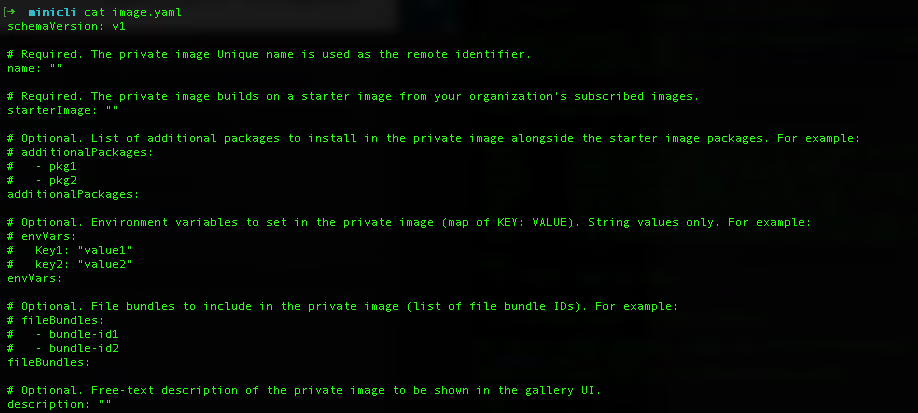
minicli outputs configurations in YAML format, providing a familiar, portable structure that can be reviewed, modified, and exported for use with existing version control systems.
minicli supports both exporting existing image structures and generating new template structures for users who want to build private images from scratch, making it easy to get started and to build repeatable, automated workflows.
Exporting an Existing Image Structure to the minicli Command Line
yaml template generated from minicli
Manage YAML Files Outside of the Minimus UI
The ability to manage YAML recipes outside of the Minimus UI gives customers greater flexibility to build on top of their images using the same automation processes already in place across their organizations. Changes such as updating packages or adding new file bundles can be made directly in the YAML file and applied by running a CLI command.
View File Bundles From the Command Line
For those using Minimus File Bundle options with custom images, minicli provides visibility into the bundles that have been created and uploaded to your tenant. In addition to listing available bundles, it also shows the contents of each bundle, making it easier to understand what resources are available and which bundles you may want to include in existing or new images.
Viewing File Bundles with minicli
Bring Image Management Into Your Development Workflow
minicli builds on Minimus’s core mission: delivering secure, hardened, near vulnerability-free images while making them easy to consume and integrate across a wide range of container-based environments.
By extending image management beyond the UI, minicli enables teams to incorporate custom image builds directly into their development workflows, CI/CD pipelines, and infrastructure automation - and treat image recipes as code alongside the rest of their software stack.















.svg)
.svg)




.svg)




.svg)