Minimus is ending operations. We appreciate the support of our many customers globally and are proud to have served you. Unfortunately, the current business and investment climate has resulted in a situation in which we are unable to continue operations. We acknowledge the effort that transitioning from our images will require and we are committed to providing customers with a stable transition period.
Beginning on Monday 24 August 2026, we will begin a 60 day maintenance period for the product and images. During this period, we will make necessary bug fixes to the overall product, provide commercial support, and continue to maintain images with upstream updates. On Thursday 22 October 2026, we will cease operations and turn off the Minimus registry (reg.mini.dev). Images pulled from the registry prior to 22 October will, of course, continue to function, but no further updated images will be provided.
For Enterprise Edition customers, we are committed to ensuring a fair and orderly conclusion to our commercial relationships. We will reach out to each Enterprise Edition customer individually, beginning on 24 August, to discuss the structured termination of your agreement, including any applicable refunds for the remaining contract period beyond 22 October.
While this is not the outcome that any of us wanted, we hope that this approach provides customers with ample opportunity to smoothly transition.
Minimus Air-Gapped by Design: Container Security for Disconnected Registries
By
Gabriele Falchini
July 23, 2026
An air gap is a network with no direct route to the internet, no live connection in or out, by design. If your registry lives behind one, the images it stores got there by hand. Someone pulled them on a machine with outside access, then moved them across the boundary, onto a drive that physically crosses a security checkpoint, or through a tightly controlled connection like a VPN into an isolated environment, and loaded them onto the registry on the other side, ready for whatever inside the boundary actually runs them. That process works, but it's also friction: every crossing takes coordination, approval, and time, so teams do it as rarely as they can get away with. That's exactly how an image ends up sitting untouched for six months while fifteen CVEs quietly ship against it.
Vulnerabilities still get disclosed on someone else's schedule. Packages still need patching. When an auditor asks when an image was last rebuilt, your compliance team still needs a real answer. Isolating the network doesn't pause any of that, it just cuts off your ability to reach outside the boundary and go get it.
Why the Workarounds Don't Hold Up
Ask most teams how they handle this today, and you'll hear some version of: “We export images manually when someone remembers to.” That answer holds up right until someone asks a follow-up question.
If nobody is tracking which image version crossed the boundary and when, you can still read the tag and timestamp on what's deployed, but you can't say whether it's the most recent version Minimus published, or produce a record of every sync that got it there. An assessor asking for that history gets a guess, not a log.
An image that hasn't been rebuilt in eight months looks identical, on the surface, to one rebuilt yesterday. In a connected environment, a scanner or a changelog eventually catches that. Behind an air gap, nothing does, because there's no connection for anything to watch.
Vulnerability scanners report against known, indexed CVEs. Behind an air gap, that feed gets refreshed the same way everything else does: someone has to carry an updated one across the boundary. If that hasn't happened recently, a clean scan just means the feed is behind, not that the image is safe.
Minimus Self-Hosting
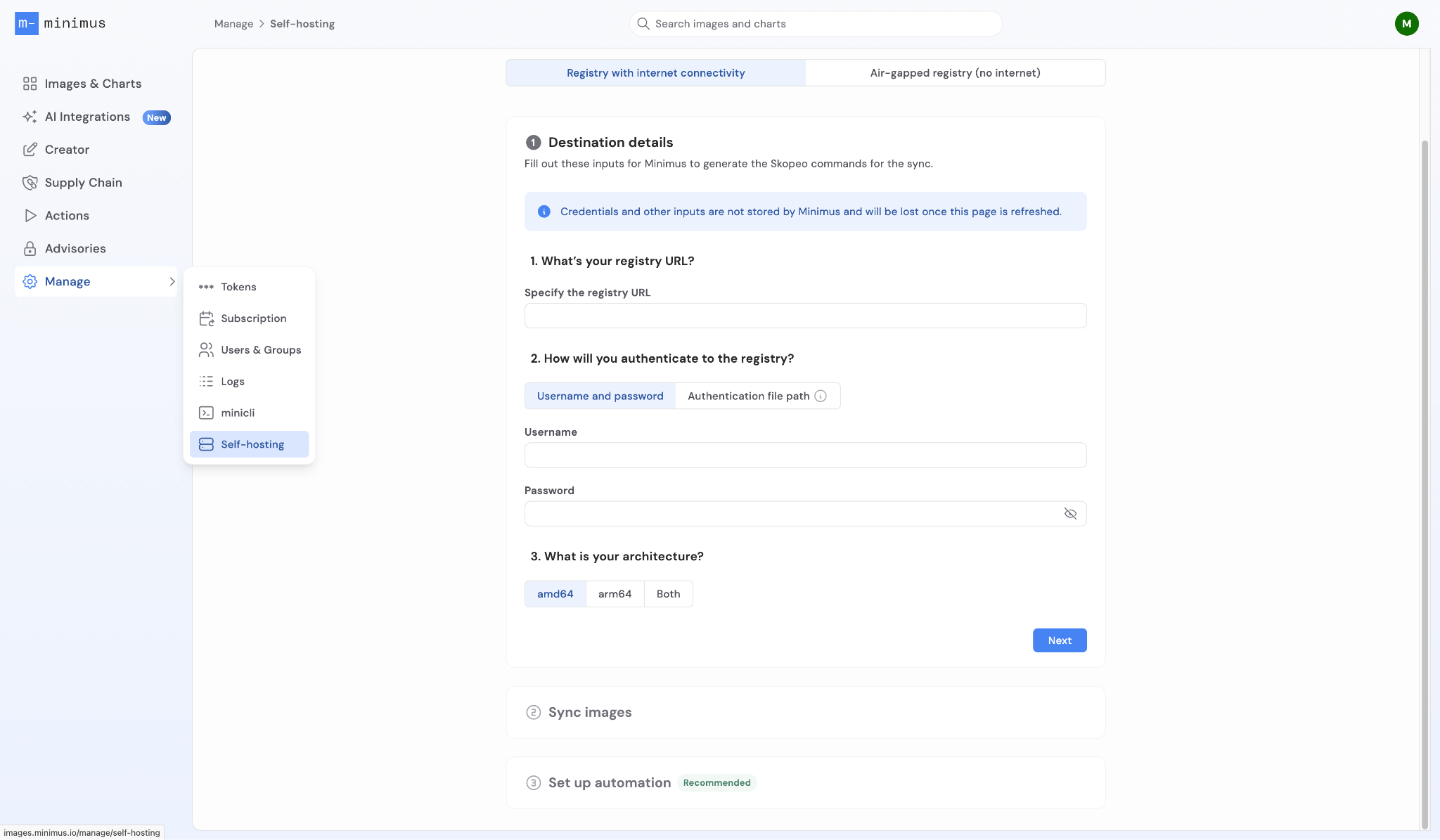
Minimus supports Self-Hosting, which lets you mirror your full Minimus image subscription. Every image and every version, mirrored into your own private registry instead of pulling directly from Minimus, using a scheduled Skopeo-based sync configured under Manage > Self-hosting (Operator or Admin role required). If your registry has outbound connectivity, the whole thing runs automatically on a cron job; if it's air-gapped, the sync automates everything up to a removable drive and leaves only the final, physical hop across the boundary as a manual, repeatable step. Either way, each synced image carries its signed SBOM and attestation with it, so the provenance and audit trail travel along with the bytes. This means teams can keep using their existing registry and processes while still getting Minimus's signed images, rebuilt as needed to stay current, and its underlying security posture, even in environments that can never talk to the Minimus registry directly.
Why Air-Gapped Environments Break the Usual Model
Most container security guidance, including a lot of what we've written on this blog, assumes a registry your infrastructure can reach whenever it needs to. Daily rebuilds only help if you're pulling daily. A changelog only helps if someone's reading it. A vulnerability report is only accurate if your systems can see it in real time.
Air-gapped environments aren't an edge case. They're standard architecture across several industries:
Defense and intelligence systems operating in classified or IL5/IL6 environments.
Financial services running core processing or trading systems on segmented networks.
Critical infrastructure and OT/ICS environments where network isolation is the primary security control, not a preference.
Healthcare systems with hard boundaries around clinical or patient-data networks.
Maritime, industrial, or edge deployments with no reliable uplink at all.
In each of these, the isolation is permanent, not a phase to grow out of. A container security model built around "pull whenever you need to" has to be rebuilt for a network that will never make that call.
Getting Started with Minimus Self-Hosting
The fix isn't asking your infrastructure to reach Minimus. It's letting Minimus's sync service reach your private registry on a schedule and through a path you control.
This is available as part of Enterprise Edition, configured from Manage > Self-hosting in the console (Operator or Admin role required; Viewers can see most of the console but not this). Once set up, the service syncs every image included in your subscription, across every version, into a registry that lives entirely inside your boundary.
There are two versions of this, depending on whether that private registry can reach the outside world at all.
Online private registry: Fully automated
If your private registry has outbound connectivity, even if your workloads don't, the sync runs as a scheduled job using Skopeo (version 1.12 or higher). Point it at the YAML manifest Minimus generates for your subscription and at your registry's URL, and Skopeo handles the transfer directly, matching architecture (amd64, arm64, or both) along the way. Schedule it at midnight, and your registry stays current without anyone touching it again.
Air-gapped registry: Partially automated, by necessity
Part of this process cannot be automated. Any provider claiming otherwise for a genuinely isolated network isn't describing an air gap. What Minimus does instead is minimize everything on either side of the one step that has to stay manual, and give you a repeatable, documented process for it.
The first hop, from Minimus to a removable drive (automatable): On a machine with internet access, Skopeo reads that same YAML manifest and pulls your full image set down to a local directory or removable drive instead of a live registry. This step runs on the same cron schedule as the online path. Your staging drive or directory stays current, ready for the moment someone needs to move it.
Hop two, from the drive into your air-gapped registry (manual, deliberately): The drive physically crosses the boundary. Once it's on a machine inside the isolated network, a second Skopeo sync reads from that local directory and pushes the images into your private registry, this time as the destination instead of the source.
That's the whole model: automate everything up to the boundary, then hand a small, well-defined, auditable action to a person for the part that has to stay a human decision.
Feature
Online Private Registry
Air-Gapped Private Registry
External Connectivity
Supported
Not supported
Automation
Fully automated via cron
Partially automated via cron
Frequency
Daily
Set by your organization
Time Investment
One-time setup
Repeated, but minimal, manual effort
What Actually Crosses the Gap
Images aren't the only thing moving in that second hop. Every Minimus image is published with a signed SBOM and a cryptographic attestation as part of the same build, not bolted on as a separate system afterward. Sync an image, and you're syncing its evidence along with it: exactly which packages are inside, at what version, tied to a signature that says where the image came from.
That matters more, not less, once you're behind a boundary. An assessor reviewing a system that has never had a live registry connection can still be shown a signed, package-level inventory for exactly what's running, tied to a specific digest without taking anyone's word for it.
Minimus's default verification uses Cosign's keyless signing, which checks a signature against Sigstore's public Rekor transparency log, a service that lives on the internet. Run cosign verify from inside a fully disconnected network and that call has nothing to check against. Two options: verify at the bridge machine before the drive crosses the boundary, or build an offline trust store inside it. Either works, but decide which one before an auditor asks you to prove it, not after.
Staying Current Without Staying Connected
Cut the connection to the Minimus registry and you lose the thing most teams rely on to know something changed: the gallery. Nobody behind an air gap is checking the console for updates.
That's what Minimus Actions are for. Configure webhooks, Slack alerts, email notifications, or GitHub Actions to fire when a new image version ships, a vulnerability fix lands, or an image line is approaching end of life. Filter down to active exploits, high EPSS scores, or specific image lines you actually run. None of that requires your infrastructure to reach Minimus. It just requires whoever owns the bridge machine to be watching.
That turns the manual hop from a liability into a decision. Your team knows what changed and picks when the next transfer is worth making, instead of finding out during an audit that the registry hasn't moved in nine months.
Where This Meets Compliance
Air-gapped environments and heavy compliance requirements show up together constantly. FedRAMP Moderate and High workloads, DoD environments (Minimus images are available through Iron Bank, the DoD's central hardened image repository), and FIPS 140-3 mandates all land on infrastructure that's isolated by design.
When an assessor asks how you maintain patch currency and provenance in an environment that can't reach the internet, "we run a documented, scheduled sync process, and every image carries its own signed SBOM" is a different answer than "someone updates it when they get a chance." We've written in more depth about how CIS, NIST, and FedRAMP fit together in containerized environments if you want the full compliance picture; this post is about the mechanics that make the image side of that story hold up once the network boundary is real.
Getting Started
Confirm you're on Enterprise Edition. Self-hosted Registry, including the air-gapped sync path, isn't part of Community Edition. If you're not sure which plan you're on, check your subscription or reach out to Minimus.
Confirm your access. Self-hosted Registry configuration requires an Operator or Admin role in Minimus RBAC. If you're not sure what you have, check with your Admin.
Install Skopeo 1.12 or higher on both your internet-connected bridge machine and your target host inside the boundary.
Go to Manage > Self-hosting in the Minimus console, select the air-gapped registry tab, and fill in your destination and authentication details.
Run your first sync to establish a baseline: images to removable media, then removable media into your private registry.
Set up Actions so your team hears about relevant fixes and new versions without checking the gallery manually.
Pick a cadence and hold to it. Weekly, biweekly, tied to a change window, whatever fits your operational rhythm. Consistency is what turns "air-gapped" from an open question into a documented control.
If you're maintaining an isolated registry by hand, or moving images across a boundary through a process nobody's fully confident in, put a documented sync pipeline next to what you're doing now and compare. Schedule a demo or dig into the self-hosted registry docs for the full setup.













.svg)
.svg)




.svg)




.svg)