When managing access to Minimus hardened images, different teams have different needs. Developers need to browse the Image Gallery and copy registry pull tokens for authentication. DevOps engineers need to configure self-hosted registries for air-gapped production environments and manage authentication tokens to maintain a strong security posture. Security leads and IT administrators need full oversight of user management and activity logs to maintain IAM infrastructure.
Before RBAC, organizations faced a dilemma: either grant everyone administrative access (creating security risks) or spend significant time manually configuring individual permissions for each user (a process that doesn't scale). As teams grow beyond 5-10 users, this permission management challenge becomes increasingly complex and time-consuming.
Minimus Role-Based Access Control
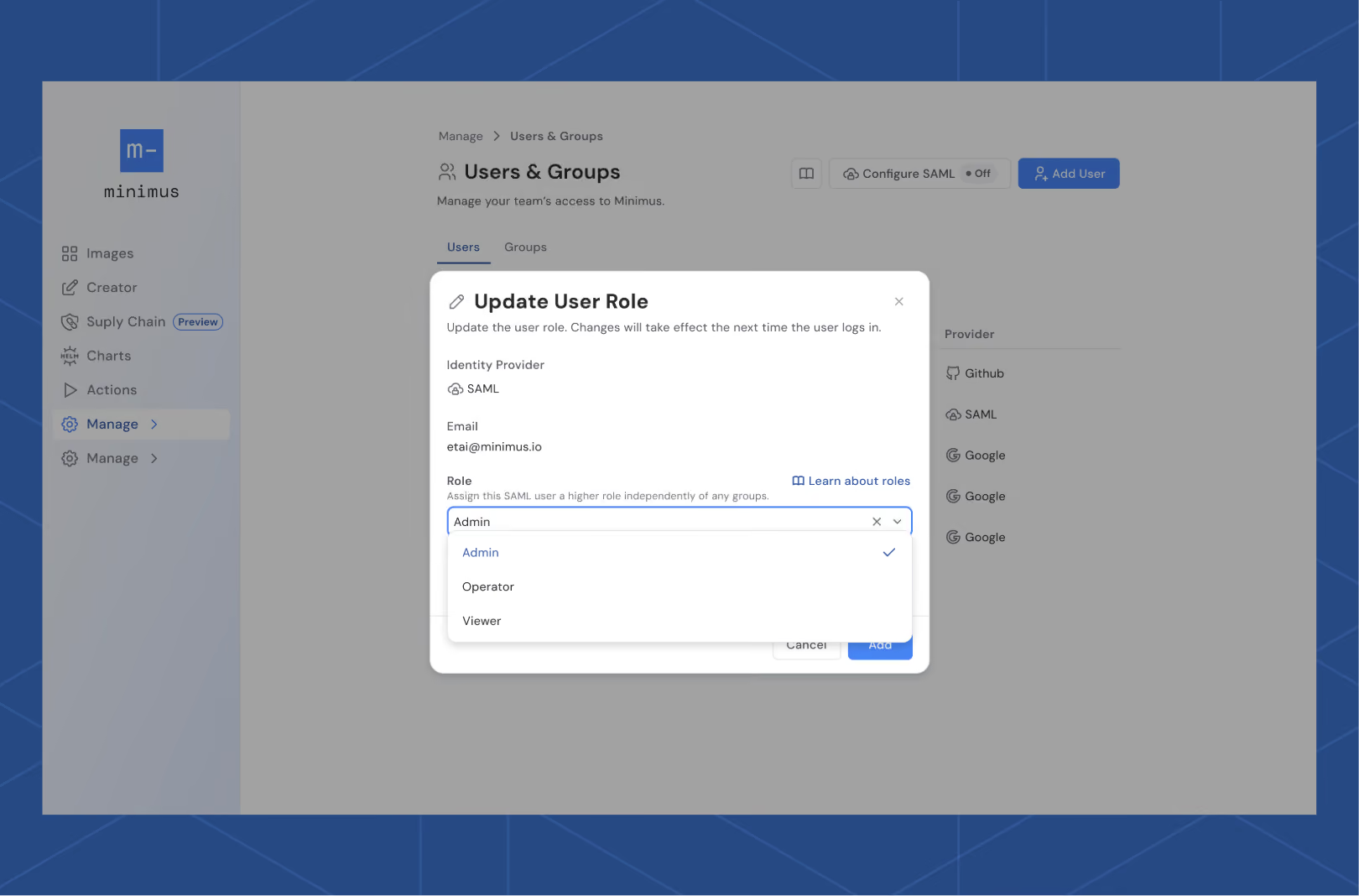
Minimus Enterprise Edition now supports Role-Based Access Control (RBAC), enabling granular permission management for all users in your organization. (Note: Community Edition users operate as individual accounts without team access controls). Instead of choosing between overly broad access or tedious individual configuration, you can assign users one of three permission levels: Viewer, Operator, or Admin. Each role is carefully designed to match common job functions and security requirements.
Existing Minimus users will find their current roles have been automatically preserved during the RBAC rollout, ensuring zero disruption to workflows.
Why RBAC Matters
Implementing RBAC delivers immediate benefits across security, operations, and compliance:
Improved Security & Least Privilege
Users receive access only to the features they need for their specific role, reducing the attack surface and preventing accidental misconfigurations. DevOps engineers can manage infrastructure without accessing user management. Developers can consume images without modifying security policies.
Streamlined Administration
Eliminate the need to configure individual permissions for every user. Assign roles based on job function, and permissions automatically align with organizational needs. When employees change roles or leave, updating a single role assignment instantly adjusts their access across all Minimus features.
Faster Onboarding & Offboarding
New team members can be assigned appropriate roles in seconds rather than requiring custom permission configuration. Offboarding becomes equally simple, removing a user or changing their role instantly revokes the associated access.
Audit & Compliance Support
RBAC creates clear, auditable trails of who has access to what. Activity Logs (available to Admin users) provide visibility into user actions, helping meet regulatory compliance requirements and internal security policies.
How RBAC Works in Minimus
Minimus supports two methods for adding users:
Direct User Addition
Add individual users via their Google email address, GitHub username, or Microsoft email address directly in the Minimus Console. This method is ideal for smaller teams or organizations not using SSO.
SSO/SAML Integration
Connect your identity provider (Microsoft Azure, Google Workspace, or Okta) to automatically sync users and groups. Available exclusively on our Enterprise Plan, this approach scales better for larger organizations and centralizes identity management in your existing IAM infrastructure. Follow the Configure SSO (Generic Guide) in the documentation to set up your integration.
Managing Permissions with Users and Groups
Minimus RBAC operates on two identity types:
Individual Users
Assign roles to specific users for fine-grained control. Individual role assignments can be managed independently through the Minimus Console.
User Groups
Unlock Enterprise Edition to create groups in the Minimus Console to assign roles to multiple users simultaneously. For SSO (Single Sign-On) enabled organizations, groups can be automatically mapped from your identity provider, allowing you to manage role assignments directly from your existing IAM tools rather than duplicating effort in multiple systems.
The Power of SSO + RBAC
Combining SSO with RBAC delivers additional benefits: centralized identity management means a single source of truth for user access, automated group synchronization reduces administrative overhead, and role changes in your identity provider automatically propagate to Minimus without manual updates. This integration is particularly valuable for organizations with frequent role changes, multiple applications, or strict compliance requirements.
Minimus RBAC Roles
Minimus currently supports three RBAC roles, each designed for different levels of access:
Admin
- Full administrative access to User Management + SAML configuration
- Full access to Activity Logs for security auditing
- Read/Write access to Token Management
- Configure and use Image Creator, Actions, and Self-hosted Registry features
- Access to Image Gallery and Helm Charts
Operator
- Read/Write access to Token Management, Image Creator, Actions, and Self-hosted Registry
- Access to Image Gallery and Helm Charts
- No access to User Management, SAML configuration, or Activity Logs
Viewer
- Read-only access to Image Creator, Actions, and Token Management (view but cannot modify)
- Access to Image Gallery and Helm Charts
- No access to Self-hosted Registry, User Management, SAML configuration, or Activity Logs
The table below provides a detailed breakdown of what each role can access within the Minimus Console:
| Feature |
Viewer |
Operator |
Admin |
| Image Gallery |
✅ |
✅ |
✅ |
| Image Creator |
RO |
RW |
RW |
| Actions |
RO |
RW |
RW |
| Self-hosted Registry |
⛔ |
✅ |
✅ |
| User Management + SAML |
⛔ |
⛔ |
RW |
| Token Management |
RO |
RW |
RW |
| Helm Charts |
✅ |
✅ |
✅ |
| Activity Logs |
⛔ |
⛔ |
✅ |
Note: Features such as Image Creator, Actions, Self-hosted Registries, and Activity Logs are only available in the Enterprise Edition. Community Edition provides open access to the Image Gallery and Helm Charts.
When users don't have access to a feature, it won't appear in their Console interface. Read-only access allows users to view features and settings but prevents any modifications.
How Role Conflicts Are Resolved: "Highest Role Wins"
A user's effective role is determined at login by evaluating all role sources and selecting the highest privilege level. This approach ensures users always have the access they need while preventing accidental permission loss.
How Minimus RBAC Works in Practice
If a user has multiple role assignments (for example, individually assigned as Viewer but part of an SSO group with Admin permissions), Minimus evaluates all sources at login and grants the highest privilege level. The calculation happens automatically at runtime.
Example
Sarah is assigned the Viewer role individually in the Minimus Console, but she's also part of the "DevOps-Admins" SSO group that has Admin permissions. When Sarah logs in, Minimus evaluates both role sources and grants her Admin access, the highest privilege level between the two.
This design ensures that adding users to additional groups or granting supplementary permissions never accidentally reduces their access level.
Why "Highest Role Wins"?
Assigning the highest role provides a clear, predictable method for resolving overlapping permissions. This approach prevents accidental loss of required access, avoids ambiguity in permission calculation, and simplifies access configurations for both administrators and users.
Getting Started with Minimus RBAC
- Review your team structure: Identify which users need Admin, Operator, or Viewer access based on their job responsibilities
- Configure roles: Log in to your Minimus Console and navigate to User Management to assign roles
- (Optional) Set up SSO: Connect your identity provider for automated group-based role assignment and centralized identity management
Learn more: Check out the comprehensive RBAC documentation for detailed configuration guides, including SSO setup and advanced role management.













.svg)
.svg)



.svg)


.svg)